
In our last post, we looked at why operators stay on systems they’ve outgrown. The short version: the move feels riskier than the problems it would solve. This post covers the other half, which is how to migrate systems without disrupting your business.
Migrating from one system to another is rarely just a question of moving data. Whether you’re replacing a legacy platform, consolidating several tools, or moving to a new operational system, the real challenge is keeping the business running while you change the systems behind it.
A successful migration looks at four things together: data, integrations, processes, and people. The technology matters, but the biggest migration problems usually start when a team overlooks one of these four.
Start with the most painful handoff
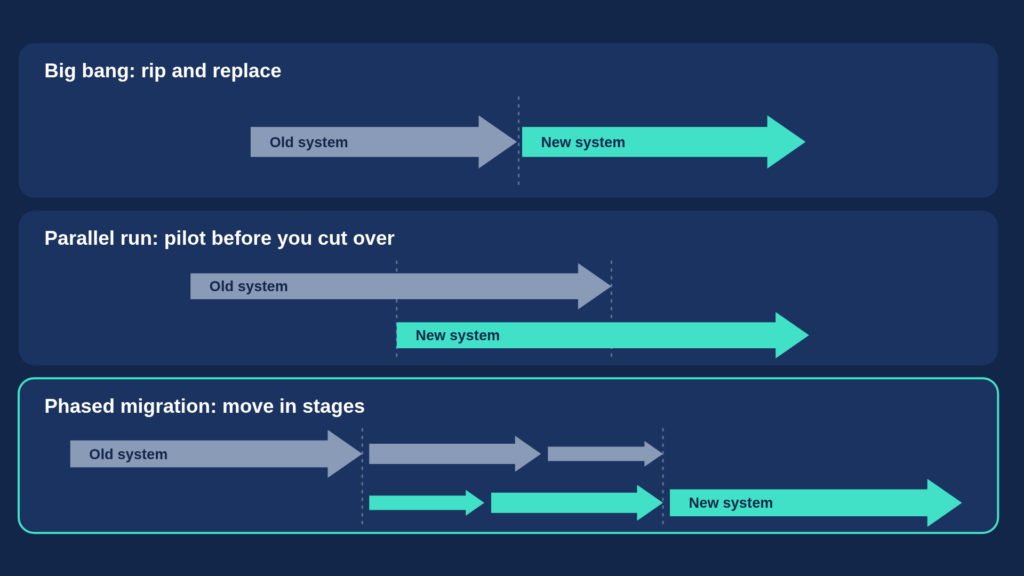
Don’t try to migrate the whole stack at once.
Start by identifying where your current system creates the most friction. It might be payment reconciliation, agent reporting, customer onboarding, inventory management, or support follow-up.
Fixing one high-impact problem first delivers visible value quickly and builds internal confidence for the next step.
Map what actually needs to change
Before moving anything, step back and map the four areas a migration touches.
Data: The easy part
Customer records, repayment history, contracts, transactions, inventory, and other historical information all need to move to the new system. In fact, compared with the other parts of a migration, data is often the most straightforward. That doesn’t mean you can treat it casually.
Map what needs to move, clean it before it moves, decide what historical information you actually need, and validate the migrated data against the old system.
Your repayment history and customer records are business assets. Treat their migration accordingly.
Integrations: Don't rebuild what already works
After all, most businesses don’t run on one system. Your existing platform may connect to mobile money providers, payment gateways, credit bureaus, SMS providers, device-locking services, accounting systems, or other third-party tools. A migration doesn’t have to mean replacing all of these. If an integration works today, the question is how the new system connects to the same ecosystem.
Where you can reuse an existing integration, do. Where you need a new connection, identify it early and include it in the migration plan.
The goal isn’t to rebuild your entire technology stack. It’s to create a new operational core that works with the systems your business already depends on.
Processes: The trickiest part
This is where migration becomes much more than a technical project. Your old system probably reflects the way your business operated when you first set it up. Over time, processes change. Workarounds appear. Teams add manual steps and develop their own ways of doing things.
Reproducing all of those processes in the new system can mean carrying the old system’s problems into the new one. Migration is an opportunity to clean your processes before you move them.
Start by mapping the processes that really matter. What is essential? Is there anything you can simplify, or anything you no longer need? Which steps should you automate? And which processes need to change because the business has changed?
Then migrate in batches. Start with the must-haves, the processes you need to keep the business running. Follow with the nice-to-haves once the core operation is stable.
Trying to reproduce every process, exception, and historical workaround on day one creates unnecessary complexity and increases disruption. A migration shouldn’t recreate the old system. It should move the business to a better way of working.
People: Bring them in early
Even a technically perfect migration can fail if the people using the system aren’t ready for it.
Administrators, sales teams, field agents, finance teams, support teams, and managers all interact with the system differently. Identify the people the change will affect most and involve them early.
First, start with a small group of trusted users. Let them test the new workflows, flag issues, and give feedback before the wider rollout. Then train teams in waves, focusing on the workflows that actually change rather than the whole platform.
People don’t need to understand every feature on day one. They need to understand what they’ll do differently on day one.
Build a core migration team
The business shouldn’t discover a migration is happening on the day the new system goes live.
Create a small core team responsible for all four areas: data, integrations, processes, and people. This team coordinates the work in the background while the existing business keeps operating, and becomes the bridge between the old operation and the new one.
Run both systems before you cut over
Whenever possible, don’t switch everything overnight.
Pilot the new system with one region, branch, team, or product line first. Run old and new processes side by side long enough to confirm that the numbers, workflows, and outputs match. This matters most for payments, repayments, customer balances, and inventory.
Problems you find during a controlled pilot are relatively cheap to fix. Problems you find after a full cutover can affect the entire operation.
Define a go-live the business can actually face
Go-live should be a clearly defined operational event, not just the day someone switches the software on.
Before that date, the core team should know what’s ready, what they’ve tested, who has completed training, and what the fallback plan is.
You also don’t need to finish everything by go-live. The goal is to have the critical processes working reliably. Additional workflows, automation, and improvements can follow once the business is running comfortably on the new platform.
In turn, this keeps the transition manageable and removes the temptation to delay a migration indefinitely because one non-critical feature isn’t ready.
A migration is an opportunity, not just a replacement
The best migrations don’t simply lift everything from the old system into a new one. They use the transition to ask better questions:
- What data do we actually need?
- What integrations should we keep?
- Which processes should we improve?
- What do our people need to do differently?
Approached this way, migration becomes more than a technology project. It becomes a chance to simplify operations, remove unnecessary workarounds, and build a system that supports the way the business runs today.
And the safest way to get there is not to change everything at once. Clean first, migrate in stages.
Test. train, then go live.
Where Upya fits
We built Upya on the principle that operators shouldn’t have to start over to modernize. As we covered in part one of this series, the fear of migration usually assumes you have to replace everything at once. Upya is modular, so teams can start with the part of the operation that needs it most and connect it to the tools they already use through an open API.
For some operators, the starting point is payments, with Payment Collection & Deal Types bringing reconciliation into one view. For others, it’s automating the manual handoffs between teams, or clearing the support backlog. A centralized view of customers, field agents, payments, and inventory can follow when the operation is ready to scale as a whole.
Each step delivers value on its own, and each one makes the next step smaller.
Not sure where your first step should be? We’re happy to map it out with you.